


Adobe Firefly is Adobe’s generative AI system designed specifically for creative work. Unlike many AI image generators that emerged from research labs or startups, Firefly was built from the ground up to integrate with professional design workflows and to respect commercial usage requirements. For anyone interested in AI illustration, digital art, or concept design, Firefly represents a structured, production-oriented approach rather than an experimental playground.
This article explains how Adobe Firefly works, what makes it different from other AI illustration tools, and how it fits into modern creative processes.
What Adobe Firefly is and why it exists
Adobe Firefly is a family of generative AI models focused on visual creation. Its primary goal is to help users generate, modify, and enhance images using natural language prompts while maintaining compatibility with Adobe’s broader creative ecosystem.
Firefly was introduced in response to two major shifts in digital art. First, generative AI made it possible to create images quickly using text prompts. Second, professional designers demanded tools that were legally safe for commercial use and consistent with industry standards. Firefly addresses both by emphasizing licensed training data and predictable output behavior.
Rather than replacing traditional design tools, Firefly is designed to extend them. It functions as an assistant that accelerates ideation, exploration, and iteration.
Core features for AI illustration
Adobe Firefly offers several features that are especially relevant to AI illustration and visual art creation.
Text-to-image generation
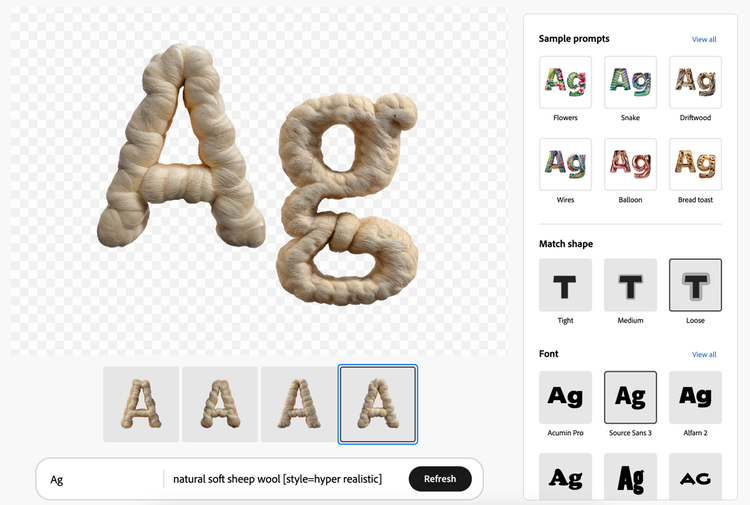
At its core, Firefly allows users to generate images from text descriptions. A prompt can describe subject matter, style, lighting, composition, and mood. Firefly then produces multiple variations that can be refined further.
Key characteristics of Firefly’s text-to-image output include:
- Clean compositions suitable for design use
- Consistent visual styles across multiple generations
- Lower tendency toward distorted anatomy or unreadable elements compared to early AI models
This makes Firefly particularly useful for concept sketches, mood boards, and illustrative assets rather than purely artistic experimentation.
Style and content controls
Firefly includes structured controls that let users guide the output beyond basic prompts. These controls typically include:
- Artistic styles such as illustration, photography, or graphic design
- Color palettes and tonal ranges
- Lighting direction and intensity
- Aspect ratio and framing
For illustrators, these options reduce the need to reword prompts repeatedly and help achieve more predictable results.
Generative fill and expansion
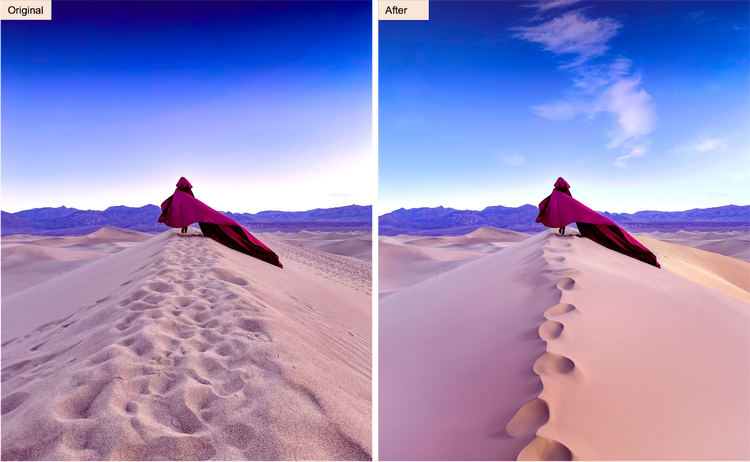
One of Firefly’s most practical features is generative fill. This allows users to select part of an image and either remove, replace, or extend it using AI-generated content that blends naturally with the surrounding area.
Common use cases include:
- Extending backgrounds for illustrations
- Replacing objects without redoing the entire image
- Adjusting composition for different formats
This capability shifts AI from a one-time image generator to a flexible editing tool.
How Firefly is trained and why it matters
A defining aspect of Adobe Firefly is how it is trained. Adobe has stated that Firefly models are trained primarily on licensed content, Adobe Stock images, and public domain material.
This approach matters for several reasons:
- It reduces legal uncertainty for commercial use
- It aligns with professional design ethics
- It supports businesses and agencies that need clear usage rights
For illustrators working on client projects, marketing materials, or monetized content, this focus on licensing is a major differentiator compared to many open or community-trained models.
Integration with Adobe’s creative ecosystem
Firefly does not exist as a standalone experiment. It is designed to integrate deeply with Adobe’s existing tools, particularly within Creative Cloud applications.
Photoshop integration
In Photoshop, Firefly powers features such as generative fill and AI-assisted editing. This allows artists to combine traditional illustration techniques with AI-driven enhancements in a single workspace.
For example, an illustrator can:
- Sketch or import a base image
- Use generative fill to refine details
- Adjust colors, layers, and textures manually
This hybrid approach preserves creative control while benefiting from automation.
Illustrator and vector workflows
Although Firefly is primarily image-focused, Adobe has been expanding its capabilities toward vector-based design. This opens possibilities for AI-assisted illustration that remains scalable and print-ready.
For designers who work across digital and print formats, this integration reduces friction between ideation and production.
Firefly compared to other AI illustration tools
While many AI image generators focus on expressive or artistic novelty, Firefly emphasizes reliability and usability.
Key differences often include:
- More conservative but consistent outputs
- Fewer extreme or surreal artifacts
- Stronger alignment with design standards
- Clearer commercial usage terms
This makes Firefly appealing to professionals, educators, and businesses, even if some experimental artists prefer more unpredictable tools.
Practical use cases for AI illustrators
Adobe Firefly supports a wide range of illustration-related workflows.
Concept art and ideation
Firefly is well suited for early-stage concept development. Artists can quickly explore visual directions before committing to detailed manual work.
Editorial and marketing illustration
For blogs, social media, and advertising, Firefly can generate base visuals that are later refined by human designers. This speeds up production while maintaining brand consistency.
Educational and instructional visuals
Firefly can help generate diagrams, simplified illustrations, and visual explanations that would otherwise require time-consuming manual drawing.
Asset generation for digital products
Icons, background illustrations, and decorative elements can be produced quickly and adjusted to fit specific layouts.
Limitations and creative considerations
Despite its strengths, Firefly is not a replacement for human illustration skills.
Some limitations include:
- Reduced originality compared to hand-drawn work
- Dependence on prompt clarity and specificity
- Less flexibility in highly abstract or symbolic art
Understanding these boundaries helps artists use Firefly as a supportive tool rather than a creative shortcut.
Ethical and artistic implications
Firefly reflects Adobe’s attempt to position AI as a collaborative partner rather than a disruptive force. By focusing on licensed data and professional integration, it aims to balance innovation with responsibility.
For artists, this raises important questions about authorship, originality, and creative identity. Firefly-generated images still require human judgment, selection, and refinement. The value lies not only in generation but in how the output is used and contextualized.
How Firefly fits into the future of AI illustration
Adobe Firefly represents a shift toward AI tools that are designed for long-term professional use. Instead of emphasizing novelty, it prioritizes reliability, control, and integration.
As AI illustration continues to evolve, tools like Firefly are likely to become standard components of creative workflows. They reduce repetitive tasks, accelerate exploration, and allow artists to focus on higher-level decisions.
Rather than asking whether AI will replace illustrators, Firefly suggests a different question: how illustrators will adapt their skills to include AI as part of their creative toolkit.
